2013년 1월 24일 목요일

반투명 메모장

// MMDlg.cpp : implementation file
//

#include "stdafx.h"
#include "MM.h"
#include "MMDlg.h"

#ifdef _DEBUG
#define new DEBUG_NEW
#undef THIS_FILE
static char THIS_FILE[] = __FILE__;
#endif

/////////////////////////////////////////////////////////////////////////////
// CAboutDlg dialog used for App About

class CAboutDlg : public CDialog
{
public:
 CAboutDlg();

// Dialog Data
 //{{AFX_DATA(CAboutDlg)
 enum { IDD = IDD_ABOUTBOX };
 //}}AFX_DATA

 // ClassWizard generated virtual function overrides
 //{{AFX_VIRTUAL(CAboutDlg)
 protected:
 virtual void DoDataExchange(CDataExchange* pDX);    // DDX/DDV support
 //}}AFX_VIRTUAL

// Implementation
protected:
 //{{AFX_MSG(CAboutDlg)
 //}}AFX_MSG
 DECLARE_MESSAGE_MAP()
};

CAboutDlg::CAboutDlg() : CDialog(CAboutDlg::IDD)
{
 //{{AFX_DATA_INIT(CAboutDlg)
 //}}AFX_DATA_INIT
}

void CAboutDlg::DoDataExchange(CDataExchange* pDX)
{
 CDialog::DoDataExchange(pDX);
 //{{AFX_DATA_MAP(CAboutDlg)
 //}}AFX_DATA_MAP
}

BEGIN_MESSAGE_MAP(CAboutDlg, CDialog)
 //{{AFX_MSG_MAP(CAboutDlg)
  // No message handlers
 //}}AFX_MSG_MAP
END_MESSAGE_MAP()

/////////////////////////////////////////////////////////////////////////////
// CMMDlg dialog

CMMDlg::CMMDlg(CWnd* pParent /*=NULL*/)
 : CDialog(CMMDlg::IDD, pParent)
{
 //{{AFX_DATA_INIT(CMMDlg)
  // NOTE: the ClassWizard will add member initialization here
 //}}AFX_DATA_INIT
 // Note that LoadIcon does not require a subsequent DestroyIcon in Win32
 m_hIcon = AfxGetApp()->LoadIcon(IDR_MAINFRAME);
}

void CMMDlg::DoDataExchange(CDataExchange* pDX)
{
 CDialog::DoDataExchange(pDX);
 //{{AFX_DATA_MAP(CMMDlg)
  // NOTE: the ClassWizard will add DDX and DDV calls here
 //}}AFX_DATA_MAP
}

BEGIN_MESSAGE_MAP(CMMDlg, CDialog)
 //{{AFX_MSG_MAP(CMMDlg)
 ON_WM_SYSCOMMAND()
 ON_WM_PAINT()
 ON_WM_QUERYDRAGICON()
 //}}AFX_MSG_MAP
END_MESSAGE_MAP()

/////////////////////////////////////////////////////////////////////////////
// CMMDlg message handlers

BOOL CMMDlg::OnInitDialog()
{
 CDialog::OnInitDialog();

 // Add "About..." menu item to system menu.

 // IDM_ABOUTBOX must be in the system command range.
 ASSERT((IDM_ABOUTBOX & 0xFFF0) == IDM_ABOUTBOX);
 ASSERT(IDM_ABOUTBOX < 0xF000);

 CMenu* pSysMenu = GetSystemMenu(FALSE);
 if (pSysMenu != NULL)
 {
  CString strAboutMenu;
  strAboutMenu.LoadString(IDS_ABOUTBOX);
  if (!strAboutMenu.IsEmpty())
  {
   pSysMenu->AppendMenu(MF_SEPARATOR);
   pSysMenu->AppendMenu(MF_STRING, IDM_ABOUTBOX, strAboutMenu);
  }
 }

 // Set the icon for this dialog.  The framework does this automatically
 //  when the application's main window is not a dialog
 SetIcon(m_hIcon, TRUE);   // Set big icon
 SetIcon(m_hIcon, FALSE);  // Set small icon
 
 // TODO: Add extra initialization here
    SLWA pSetLayeredWindowAttributes = NULL;  // 함수포인터 선언, 초기화.
 HINSTANCE hmodUSER32 = LoadLibrary("USER32.DLL"); // 인스턴스 얻음.
 pSetLayeredWindowAttributes=(SLWA)GetProcAddress(hmodUSER32,"SetLayeredWindowAttributes");    
 //함수포인터 얻음.
 HWND hwnd = this->m_hWnd; //다이얼로그의 핸들 얻음.
 SetWindowLong(hwnd, GWL_EXSTYLE,GetWindowLong(hwnd, GWL_EXSTYLE) | WS_EX_LAYERED);
 pSetLayeredWindowAttributes(hwnd, 0, (255 * 50) / 100, LWA_ALPHA);
 
 return TRUE;  // return TRUE  unless you set the focus to a control
}

void CMMDlg::OnSysCommand(UINT nID, LPARAM lParam)
{
 if ((nID & 0xFFF0) == IDM_ABOUTBOX)
 {
  CAboutDlg dlgAbout;
  dlgAbout.DoModal();
 }
 else
 {
  CDialog::OnSysCommand(nID, lParam);
 }
}

// If you add a minimize button to your dialog, you will need the code below
//  to draw the icon.  For MFC applications using the document/view model,
//  this is automatically done for you by the framework.

void CMMDlg::OnPaint() 
{
 if (IsIconic())
 {
  CPaintDC dc(this); // device context for painting

  SendMessage(WM_ICONERASEBKGND, (WPARAM) dc.GetSafeHdc(), 0);

  // Center icon in client rectangle
  int cxIcon = GetSystemMetrics(SM_CXICON);
  int cyIcon = GetSystemMetrics(SM_CYICON);
  CRect rect;
  GetClientRect(&rect);
  int x = (rect.Width() - cxIcon + 1) / 2;
  int y = (rect.Height() - cyIcon + 1) / 2;

  // Draw the icon
  dc.DrawIcon(x, y, m_hIcon);
 }
 else
 {
  CDialog::OnPaint();
 }
}

// The system calls this to obtain the cursor to display while the user drags
//  the minimized window.
HCURSOR CMMDlg::OnQueryDragIcon()
{
 return (HCURSOR) m_hIcon;
}
MMDlg.h
// MMDlg.h : header file
//

#if !defined(AFX_MMDLG_H__A5A84B3C_CBD5_4E73_9B50_B9A76CF39CD0__INCLUDED_)
#define AFX_MMDLG_H__A5A84B3C_CBD5_4E73_9B50_B9A76CF39CD0__INCLUDED_

#if _MSC_VER > 1000
#pragma once
#endif // _MSC_VER > 1000

//헤더에 선언
#define WS_EX_LAYERED          0x00080000 
#define LWA_COLORKEY            0x00000001 
#define LWA_ALPHA              0x00000002 
#define ULW_COLORKEY            0x00000001 
#define ULW_ALPHA              0x00000002 
#define ULW_OPAQUE              0x00000004 

typedef BOOL(WINAPI *SLWA)(HWND, COLORREF, BYTE, DWORD);


/////////////////////////////////////////////////////////////////////////////
// CMMDlg dialog

class CMMDlg : public CDialog
{
// Construction
public:
	CMMDlg(CWnd* pParent = NULL);	// standard constructor

// Dialog Data
	//{{AFX_DATA(CMMDlg)
	enum { IDD = IDD_MM_DIALOG };
		// NOTE: the ClassWizard will add data members here
	//}}AFX_DATA

	// ClassWizard generated virtual function overrides
	//{{AFX_VIRTUAL(CMMDlg)
	protected:
	virtual void DoDataExchange(CDataExchange* pDX);	// DDX/DDV support
	//}}AFX_VIRTUAL

// Implementation
protected:
	HICON m_hIcon;

	// Generated message map functions
	//{{AFX_MSG(CMMDlg)
	virtual BOOL OnInitDialog();
	afx_msg void OnSysCommand(UINT nID, LPARAM lParam);
	afx_msg void OnPaint();
	afx_msg HCURSOR OnQueryDragIcon();
	//}}AFX_MSG
	DECLARE_MESSAGE_MAP()
};

//{{AFX_INSERT_LOCATION}}
// Microsoft Visual C++ will insert additional declarations immediately before the previous line.

#endif // !defined(AFX_MMDLG_H__A5A84B3C_CBD5_4E73_9B50_B9A76CF39CD0__INCLUDED_)

2013년 1월 23일 수요일

엑세스 함수

※ 오늘 Daily Tip은 염기웅님이 제공해주신 내용입니다.

얼마 전 액세스 강의하는 시간에 한 분이 ‘엑셀 함수는 책도 있고, 자료도 많아 보기가 편한데 액세스 함수만 따로 설명해 놓은 책은 없더군요. 액세스 함수 정리된 것은 없나요?’ 라고 말씀하시더군요. 마침 강의자료로 수강생 분들께만 드리던 자료가 있어 그 분의 요청에 답할 수 있었습니다. 하지만 온라인 상의 많은 분들도 이러한 문제점이 있을 것 같아 소개해 드립니다. 

다음의 내용은 자주 사용하는 액세스 함수를 정리해 놓은 표입니다. 다음의 내용은 화면으로 볼 때 괜찮은 방법입니다. 혹시 출력해서 따로 보실 분은 다음의 링크를 클릭하여 다운로드 받은 후 출력해서 보기 바랍니다.[자료다운로드하기] 
그리고 이 표는, 액세스 함수에 대한 간략한 설명만을 정리하였습니다. 보다 자세한 내용은 액세스 도움말을 참고하기 바랍니다. 도움말 대화상자에서 해당 함수명을 입력해 보세요! 
구분 용법 함수명 개요 정의 예제
날 짜
 

&
시
간
 
Date Date() 현재
날짜
구함
현재 시스템 날짜를 포함한 Variant(Date) 값을 반환합니다. ?date
2002-02-29
Time  
 
Time() 현재
시간
구함
 현재 시스템 시간을 나타내는 Variant(Date) 값을 반환합니다. ?time
오후 2:14:37
Now 
 
Now() 현재
날짜,
시간
구함
컴퓨터의 시스템 날짜와 시간에 따른 현재 날짜와 시간을 지정하는 Variant(Date) 값을 반환합니다. ?now
2002-02-29 오후 2:14:53
Year  
 
Year(date) 연도
추출
연도를 나타내는 정수를 포함한 Variant(Integer) 값을 반환합니다. ?year(#2003-05-03#)
2003
Month   
 
Month(date) 월
추출
연도를 기준으로 해서 월을 나타내는 1부터 12까지의 정수를 지정하는 Variant(Integer) 값을 반환합니다. ?month(#2003-05-03#)
5
Day   
 
Day(date) 일
추출
해당 월의 날짜를 나타내는 1에서 31까지의 정수를 지정하는 Variant(Integer) 값을 반환합니다. ?day(#2003-05-03#)
3
Hour  
 
Hour(time) 시간
추출
시간을 나타내는 0에서 23 사이의 정수를 지정하는 Variant(Integer) 값을 반환합니다.  ?hour("2002-02-28 오후 2:16:48")
14
Minute  
 
 Minute(time) 분
추출
시간의 분을 나타내는 0에서 59까지의 정수를 지정하는 Variant(Integer) 값을 반환합니다. ?minute("2002-02-28 오후 2:16:48")
16
Second  
 
Second(time) 초
추출
분의 초를 나타내는 0에서 59 사이의 정수를 지정하는 Variant(Integer) 값을 반환합니다. ?second("2002-02-28 오후 2:16:48")
48
Weekday  
 
Weekday(date, [firstdayofweek]) 요일
추출
(숫자로)
 요일을 나타내는 정수를 포함한 Variant(Integer) 값을 반환합니다. ?weekday("2002-02-28 오후 2:16:48")
5
MonthName  
 
MonthName(month[, abbreviate]) 월이름
추출
지정된 월을 나타내는 문자열을 반환합니다. ?MonthName(2)
2월
WeekdayName   
 
WeekdayName(weekday, abbreviate, firstdayofweek) 요일
이름
추출
해당되는 주의 지정된 요일을 나타내는 문자열을 반환합니다. ?WeekdayName(2)
월요일
DateSerial  
 
DateSerial(year, month, day) 숫자로
날짜
데이터
만들기
지정된 년, 월, 일의 Variant(Date) 값을 반환합니다. ?DateSerial(1969, 2, 12)
1969-02-12
TimeSerial 
 
TimeSerial(hour, minute, second) 숫자로
시간
데이터
만들기
특정 시, 분, 초에 대한 시간을 나타내는 Variant (Date) 값을 반환합니다.  ?timeserial(18,33,22)
오후 6:33:22
DateAdd   DateAdd(interval, number, date) 날짜
데이터
뺄셈
특정 시간 간격을 포함한 Variant(Date) 값을 반환합니다. ?DateAdd("m", 1, "95년 1월 31일")
1995-02-28
 
DateDiff   DateDiff(interval, date1, date2[, firstdayofweek[, firstweekofyear]]) 날짜
데이터
뺄셈
지정된 두 날짜 간의 시간 간격을 의미하는 Variant(Long) 값을 반환합니다. ?DateDiff("d",#2003-01-01#,#2003-01-05#)
4
 
DatePart 
 
DatePart(interval, date[,firstdayofweek[, firstweekofyear]]) 날짜
요소
추출
주어진 날짜의 지정된 부분을 포함하는 Variant(Integer) 값을 반환합니다. ?DatePart("q", #2002-11-05#)
4
변 환 NZ   Nz(Value, ValueIfNull) 널 값
변형
출력
Nz 함수를 사용하여 Variant가 Null일 때 0이나 빈 문자열(" ") 또는 지정된 다른 값을 반환할 수 있습니다.  
Val   
 
Val(string) 문자
데이터
숫자로
전환
문자열 내에 포함된 숫자를 적절한 형식의 숫자값으로 반환합니다. ?Val(" 1615 198th Street N.E.")
1615198
?Val("&HFFFF")
-1
수 학 Sin  Sin(number) 사인 값
계산
  각도를 라디안으로 환산하려면 각도에 pi/180를 곱합니다. 라디안을 각도로 환산하려면 라디안에 180/pi을 곱합니다.
Cos Cos(number) 코사인값 계산
Tan Tan(number) 탄젠트
값 계산
Sqr 

 
Sqr(number) 제곱근
계산
숫자의 제곱근 값을 지정하는 Double을 반환합니다. ?Sqr(9)
3
?Sqr(2)
1.41421
35623731
Round Round
(expression[,numde
cimalplaces])
반올림 지정된 소수 자릿수로 반올림된 숫자를 반환합니다. ?Round(1.5)
2
 
?Round(1.4)
1
 
Int  

 
Int(number) 정수
부분
추출
number의 분수 부분을 없애고 정수 부분만을 반환합니다. ?Int(8.4)
8
?Int(-8.4)
-9
Fix  Int(number) ?Fix(8.4)
8
?Fix(-8.4)
-8
Rnd
 
 Rnd[(number)] 난수
추출
난수를 포함하는 Single을 반환합니다. 특정 범위의 난수 발생 공식:
Int((상한값 - 하한값 + 1) * Rnd + 하한값)
Abs 
 
Abs(number) 절대값
계산
절대 수치값을 지정하여 전달된 수치와 동일한 형식의 값을 반환합니다. ?Abs(5)
5
?Abs(-5)
5
텍
 
스
 

트
 
Len   Len(string | varname) 문자열
길이
계산 문자열 내의 문자 수 또는 변수를 저장하는 데 필요한 바이트 수를 포함하는 Long 값을 반환합니다. ?Len("Good After
noon!")
15
?Len("안녕하세요?")
6
 
UCase
 
 UCase(string) 대문자로 변환  대문자로 변환된 지정된 문자열을 포함하는 Variant(String) 값을 반환합니다. ?UCase("Good Afternoon!")
GOOD AFTERNOON!
Left   Left(string, length) 왼쪽부터 문자열 추출 문자열 왼쪽부터 지정된 수 만큼의 문자를 포함하는 Variant(String) 값을 반환합니다. ?Left("Good Afternoon!",7)
Good Af
 
Right 
 
Right(string, length) 오른쪽부터 문자열 추출 문자열의 오른쪽으로부터 지정된 수의 문자를 포함하는 Variant(String) 값을 반환합니다. ?Right("Good Afternoon!",7)
ernoon!
Mid   Mid(string, start[, length]) 중간부터 문자열 추출 한 문자열에서 지정된 수의 문자를 포함하는 Variant(String) 값을 반환합니다. ?Mid("Good Afternoon!",7,4)
fter
 
LTrim   LTrim(string) 왼쪽
공백
없애기
지정된 문자열의 왼쪽에 공백이 없는(LTrim), 오른쪽에 공백이 없는(RTrim), 또는 양쪽 끝에 공백이 없는(Trim) 문자열의 복사본을 포함하는 Variant(String) 값을 반환합니다. ?LTrim(" Good Afternoon! ")
Good Afternoon!
 
RTrim  
 
RTrim(string) 오른쪽
공백
없애기
지정된 문자열의 왼쪽에 공백이 없는(LTrim), 오른쪽에 공백이 없는(RTrim), 또는 양쪽 끝에 공백이 없는(Trim) 문자열의 복사본을 포함하는 Variant(String) 값을 반환합니다. ?RTrim(" Good Afternoon! ")
Good Afternoon!
Trim  Trim(string) 양쪽
공백
없애기
지정된 문자열의 왼쪽에 공백이 없는(LTrim), 오른쪽에 공백이 없는(RTrim), 또는 양쪽 끝에 공백이 없는(Trim) 문자열의 복사본을 포함하는 Variant(String) 값을 반환합니다. ?Trim(" Good Afternoon! ")
Good Afternoon!
 
Replace
 
 Replace(expression, find, replace[, start[, count[, compare]]]) 문자열
교체
 지정된 부분 문자열이 지정된 횟수만큼 다른 부분 문자열로 대체된 문자열을 반환합니다. ?Replace("Good
Afternoon!
Afternoon is...
","Afternoon",
"Morning")
Good Morning!
Morning is...
?Replace
("Good Afternoon!
Afternoon is...","
Afternoon",
"Morning",1,1)
Good Morning!
Afternoon is...
InStr   InStr ([start, ]string1, string2[, compare]) 문자열
검색(앞부터)
한 문자열 안에 특정 문자열이 처음으로 나타난 위치를 지정하는 Variant(Long) 값을 반환합니다. ?InStr("Good Afternoon!
Afternoon is...","
Afternoon")
6
 
InStrRev  
 
InstrRev(stringcheck, stringmatch[, start[, compare]]) 문 자열
검색(뒤부터)
다른 문자열 내에서 한 문자열이 시작하는 위치를 문자열 끝에서부터 계산하여 반환합니다. ?InStrRev
("Good A
fternoon!
Afternoon is...","
Afternoon")
17
Format  
 
Format(expression[, format[, firstdayofweek[, firstweekofyear]]]) 서식
지정
Format 식의 명령대로 구성된 식이 포함된 Variant(String) 값을 반환합니다. ?Format
("2002-02-28
오후 2:16:48","
yyyy년의 mm번째
달 dd번째
날입니다.")
2002년의 02번째
달 28번째
 날입니다.
?Format(34982,
"#,##0.00")
34,982.00
?Format(1,"000")
001
프로
그램

흐름
 
Choose  
 
Choose(index, choice-1[,choice -2, ... [,choice -n]]) 목록에서
값 선택
인수 목록에서 값을 선택하고 반환하는 경우 사용합니다.  ?Choose(1, "Speedy", "United", "Federal")
Speedy
?Choose(2, "Speedy", "United", "Federal")
United
IIF 
 
 IIf(expr, truepart, falsepart) 조건에 따른 분기 IIf(expr, truepart, falsepart) ?IIF(1>2,"1을 2보다 큽니다,","1은 2보다 작습니다.")
1은 2보다 작습니다.
Switch 
 
Switch(expr-1, value-1[,expr-2, value-2 _ [,expr-n,value -n]]) 조건에 따른 분기 식들의 목록을 평가한 후 목록에서 True 값을 갖는 최초의 식과 관련된 Variant 값이나 식을 반환합니다. 1) 모듈에 정의된 함수
Function MatchUp(CityName As String)

MatchUp = Switch(CityName = "London", "English", CityName = "Rome", "Italian", CityName = "Paris", "French")

End Function

2) 적용 예
?MatchUp("Rome")
Italian
도
메
인

계
산
 
DAvg  DAvg(expr, domain, criteria) 평균
구하기
특정 레코드 집합(도메인)의 평균 값 계산 캘리포니아로 선적한 화물에 대한 평균 운송료 계산 예제
DAvg("[Freight]", "Orders", "[ShipRegion] = 'CA'")
 
DCount   DCount(expr, domain, criteria) 레코드 개수 세기 지정한 레코드 집합(도메인)에 있는 레코드 개수 확인 캘리포니아까지 선적해야 하는 물품의 수량 계산 예제
DCount("[OrderID]", "Orders", "[ShipRegion] = 'CA'")
 
DLookup  DLookup(expr, domain, criteria) 레코드 찾기 지정한 레코드 집합(도메인)의 특정 필드 값을 구함 [EmployeeID]가 1인 사람의 '성'을 검색하는 예제
DLookup("[LastName]", "Employees", "[EmployeeID] = 1")
 
DMax  
 
DMax(expr, domain, criteria) 최대값 구하기 지정된 레코드 집합(도메인)에서 최대값 결정 영국에 선적된 물품에 대한 Freight 필드에서 최대값을 반환하는 예제
DMax("[Freight]", "Orders", "[ShipCountry] = 'UK'")
DMin   
 
DMin(expr, domain, criteria) 최소값 구하기 지정된 레코드 집합(도메인)에서 최소값 확인 영국으로 선적된 물품에 대한 Freight 필드의 최소값을 반환하는 예제
DMin("[Freight]", "Orders", "[ShipCountry] = 'UK'")
DSum  
 
DSum(expr, domain, criteria) 합계
구하기
지정된 레코드 집합(도메인)에 있는 값의 합계 계산 영국에 선적된 물품에 대한 Freight 필드의 합계를 반환하는 예제
DSum ("[Orders]![Freight] ", "[Orders]", "[ShipCountry] = 'UK'")

2013년 1월 22일 화요일

mathjax


LaTeX Editor

This link http://www.codecogs.com/latex/eqneditor.php(external link) is an online WYSIWYG LaTeX editor that creates math expressions using templates. The LaTeX is automatically written and a preview is displayed. Just copy the code and paste it. Be sure to enclose the LaTeX in dollar signs ($).

2013년 1월 21일 월요일

pass

#include  
#include 

int main(void) 
{ 

char pw[100];
char cpw[] = "angel";
while(1){
printf("Enter Passwords: ");
scanf("%s", pw);
if (!strcmp(pw, cpw)){
printf("correct password, welcome!");
break;
}
else{
printf("incorrect password\n");
}
}
return 0;
}
ollydbg pe dumper 다운로드 http://tuts4you.com/download.php?view.87 dll 파일을 ollydbg 폴더에 넣는다
incorrect 부분을 찾아 jmp 주소를 correct 부분의 주소로 바꿔준다
주소를 변경했으면 마우스 오른쪽버튼 틀리 [make dump process] 선택 pe dumper를 이용하여 바이너리 형태로 저장한다.
저장한 파일을 실행하여 아무 문자열이나 넣으면 correct 부분으로 점프하게 되고 올바른 비밀번호를 입력한 것처럼 종료된다


또 다른 방법

strcpy에 F2로 브레이크포인트 걸고 F9눌러 실행시킨 후에 fuck 입력
fuck 아래 angel이 보인다


2013년 1월 20일 일요일

[c++/class] 상속

g++로 컴파일
#include "CSChild.h"
#include "iostream"

using namespace std;

int main()
{
 CSChild cs1;
 
     cs1.swap();
	 cout << cs1.a << cs1.b << endl;
 
    return 0;
 
}


#include "CS.h"
#include "iostream"

using namespace std;

class CSChild : public CS
{
public:
    CSChild(){
           }
};


//CS.h -----------------------------

#include "iostream"
using namespace std;

class CS{
public:
    int a, b;
    CS(){
    a = 8;
    b = 10;
    }
    void swap()
    {
        int temp;
        temp = a;
        a=b;
        b =temp;
    }
};


2013년 1월 19일 토요일

Activation and Function of T and B cells


Chapter 10 - Activation and Function of T and B cells

1.    CD 4 (+) T-cells become activated by antigen presenting cells (APC's).  Naive CD4(+) cells are activated by dendritic cells.  Memory CD4(+) cells interact well with macrophages.
Figure 10.1 shows the basic model of how dendritic cells interact with CD4(+) T-cells:
Dendritic cells are phagocytic cells that also have sets of pattern recognition receptorscalled Toll-like receptors (TLRs).
The engagement of  TLRs by microbial products causes:
·      The release of a number of cytokines and chemokines, many of which are pro-inflammatory
·      The maturation of the dendritic cells into efficient antigen presenting cells
o     Increase MHC class II molecule expression
o     Increase B7 expression
o     Migration of the dendritic cell to T-cell areas of the lymph nodes
Figure 10.2 is a diagram of the Immunological Synapse
This indicates all of the receptor combinations that must come together in order to acivate CD4(+)T-cells
The ultimate result of the interaction of all of these receptor combinations is the activation ofintracellular signaling cascades as indicated in Fig. 10.3
·      Tyrosine kinases (src family = fyn and lyk) phosphorylate “immunoreceptor tyrosine-based activation motifs” or ITAMS on the intracellular parts (cytoplasmic tails) of the various receptors.
·      New tyrosine kinases (syk family = ZAP-70), attracted to the newly phosphorylated cytoplasmic tails, get phosphorylated and activated.
·      ZAP-70 then phosphorylates and activates adaptor molecules which attract, bind and activate a large group of enzymes (such as phospholipase C-g and protein kinase C)
·      This in turn causes the activation of a group of cytoplasmic transcription factors(NF-kB, NF-AT and AP-1).  These transcription factors move into the nucleus of the newly activated T-cell and activate the transcription of “immune response genes”, causing the growth and proliferation of the T-cell as well as the synthesis of cytokines
(Note that certain substances such as superantigens and lectins (such as concanavalin A, pokeweed mitogen and phytohemagglutinin)  can short circuit the above mechanism through promiscuous binding.  Such substance are often referred to as polyclonal activators ormitogens.)
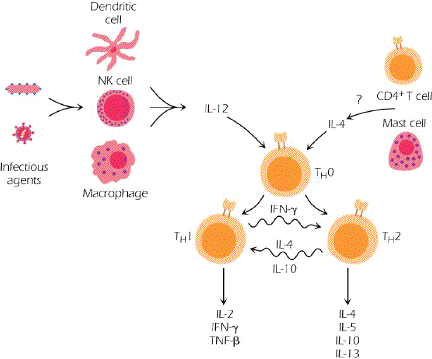
Figure 10.5 summarizes current understanding about the differentiation of CD4(+) T-cells after activation.  Note that these cells can develop down different paths which are identified by the constellation of cytokines which they produce.  Note also that the differentiation pathway is influenced (determined) by the cytokines present at the time of initial antigen activation:
·      Thus if there is plenty of IL-12 around at the time of activation, then TH1 cells develop.  On the other hand, if there is plenty of IL-4 around, then TH2 cells develop.
o     TH1 cells are characterized by the production of IL-2, IFN-g and TNF-b (see pg 153).
·      These cells help activate “cell-mediated immunity” – primarily CD8(+) T-cells, NK cells and macrophages.  IgG antibody responses are augmented by TH1 cells too.
o     TH2 cells are characterized by the production of IL-4, IL-5, IL-10 and IL-13 (see pg 153)
·      These cells are important for efficient antibody production, particularly for the production of IgE
o     TH1 and TH2 cells can inhibit each other.
T and B cells cooperate in the evolution of the immune response to an antigen through the process of linked recognition
Note, as shown in fig 10.6, that B-cells have the ability to capture and present antigen.  Because this happens through the B-cell receptor, this is “specific” capture and presentation.
This allows the efficient presentation of antigen to CD4(+) T cells by B-cells that already have the ability to make antibody to that antigen.
Figure 10.7 shows the various receptors that engage between B-cells and T-cells.  Note that there are many parallels to what we have seen already with the dendritic cell model. 
Isotype switching will require both the engagement of CD154 with CD40 and the production of cytokines by the T-cell.

Cytotoxic T-cells – CD8(+) T-cells

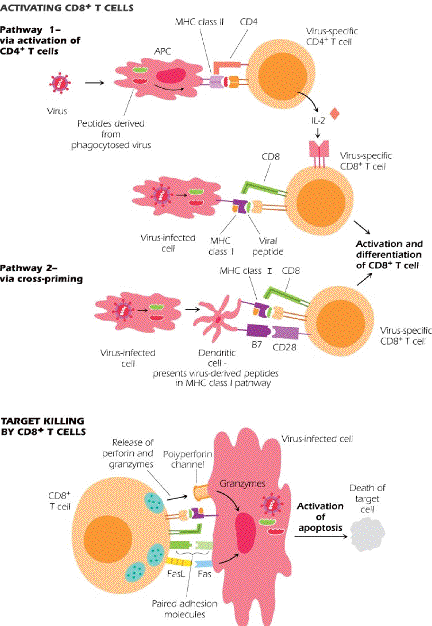
Figure 10.8 diagrams 2 things: a) How CD8(+) T-cells get activated and b) How they kill target cells.
Note that Cytotoxic T Lymphocytes (CTL’s, CD8(+) T-cells) can be activated by two pathways.  In both pathways the CTL must recognized antigen which has been processed and presented on MHC class I molecules. 
·      In the first pathway, CD4(+) T-cells (TH1 cells) provide help in launching the CTL on its way
·      In the second pathway, dendritic cells provide the help.  The figure indicates that the help is different – this probably prevents the dendritic cell from being killed by the CTL!!??
After activation, the CTL is now capable of killing target cells – that is, cells that are expressing the activating antigen in the context of MHC class I.
There are two killing mechanisms:
·      The secretion of enzymes onto the target cell which induce permeability changes and apoptosis – perforin and granzymes
·      The interaction of Fas on the CTL with FasL on the target cell activates caspases within the target cell and results in apoptosis.

T-Independent antigens

There are a number of antigens – usually polysaccharide or lipopolysaccharide – with multiple repetitive epitopes, that are capable of activating reactive B-cells without T-cell help.
These antigens generate the production of IgM and there is no apparent immunological memory.

동방결절


심장의 전기 자극 발생과 전도

심장 내 전기 자극은 우심방에 위치한 동방결절이라는 작은 부위에서 스스로 발생하여 좌, 우 심방으로 퍼져나가 심방 근육을 수축시킨 후에 우심방과 우심실 경계 부위에 위치한 방실결절이라는 작은 조직에 도달됩니다. 이 곳에 도달 된 전기 자극은 특수한 자극전도계라는 전기 줄을 통하여 좌, 우 심실로 빠르게 퍼져나가 이 부위의 심장 근육을 수축시킵니다. 즉 동방결절에서 스스로 발생하는 전기 자극이 심방과 심실로 전파가 되면서 심방, 심실 근육이 일정 간격으로 순차적으로 수축하고 늘어나는 과정을 반복함으로써 심장 내로 들어온 피가 폐와 신체 내 다른 부위를 순환하게 됩니다.
심방세동

Mechanism and Events of Contraction

Some cardiac muscle cells are self-excitable or autorhythmic. These cells generate an action potential that spreads throughout the myocardium, causing the heart to contract as a single unit.
Unlike skeletal muscle there are no individual motor units and no motor unit recruitment. In addition, the heart’s absolute refractory period is longer than a skeletal muscle’s, preventing tetanic contractions.

Energy Requirements